Snappier IPTV

Your Premium IPTV Experience

All features. All devices. One subscription.

Snappier IPTV is a player app — bring your own IPTV subscription. We do not provide channels or content.

iOS
iPadOS
tvOS
macOS
Download on the App Store

Get help, report bugs, and chat directly with the developer and community.

Why Snappier?

Snappier IPTV is built for people who want a fast, polished IPTV player without the clutter. It works with your existing IPTV subscription and gives you a premium viewing experience across all your Apple devices — from iPhone to Apple TV.

Everything you want to watch,
beautifully presented

From live TV to movies and series — a cinematic viewing experience on every device.

📺

Live TV

Browse channels in grid, list, or EPG view, organized by category with channel logos, recently watched, and fast playback.

🎬

Movies & TV Series

Rich TMDB metadata with posters, ratings, season browsers, and automatic watch progress tracking across devices.

🖥️

Multi-Screen Mode

Watch up to 9 channels simultaneously with flexible multi-player layouts. Perfect for sports fans and news junkies.

▶️

Media Players

Choose your preferred player — KSPlayer, VLC, or launch in Infuse or VLC app. Seamless codec support for every stream.

💬

Subtitles

OpenSubtitles.com integration, AI-powered speech recognition (iOS/iPadOS), and fully customizable subtitle appearance to match your preferences.

📌

Picture-in-Picture

Keep watching while you browse. Native PiP support lets you multitask without missing a moment. (iOS/iPadOS)

Catchup TV

Missed a show? Rewind and watch programmes from the past with provider-supported catchup and timeshift.

🌐

Open Network Stream

Paste any URL and play it instantly. Direct support for HLS, MPEG-TS, and other streaming protocols.

▶▶

Fast Forward & Rewind

Scrub through content with intuitive forward and rewind controls. Jump ahead or back with customisable skip intervals.

Auto Resume

Pick up right where you left off. Snappier remembers your position in movies, series, and live streams across sessions.

🎬

Movie Extras

Watch trailers and bonus content for movies and series powered by TMDB.

🎨

Dynamic Range & Framerate Matching

Automatic HDR and framerate switching on Apple TV. Your display adapts to match the content for the best picture quality.

The most powerful
TV Guide on any IPTV app

No other IPTV app comes close. Snappier IPTV includes its own dedicated EPG service — so even if your provider doesn't supply programme data, you're still covered.

Snappier EPG Service
📡

Our Own EPG Service — Built In

Most IPTV apps rely entirely on your provider's EPG data. Snappier IPTV ships with its own EPG service that automatically matches your channels to programme listings — no configuration needed. If your provider's EPG is missing or incomplete, Snappier fills the gaps so you always know what's on.

📋

Full Electronic Program Guide

A real-time, scrollable grid that shows what's on now and next across all your channels. Filter by category, search by programme name, and jump straight to any channel — just like a traditional TV guide, but better.

Lightning-Fast Guide Loading

Even the largest TV guide files load in seconds, not minutes. Multiple processing engines work in parallel so your programme listings are ready almost instantly.

🔄

Built-In EPG Backup

Use your provider's EPG or our built-in service. If your provider's EPG is missing countries or doesn't offer one at all, Snappier's guide fills the gap so you're never without programme listings.
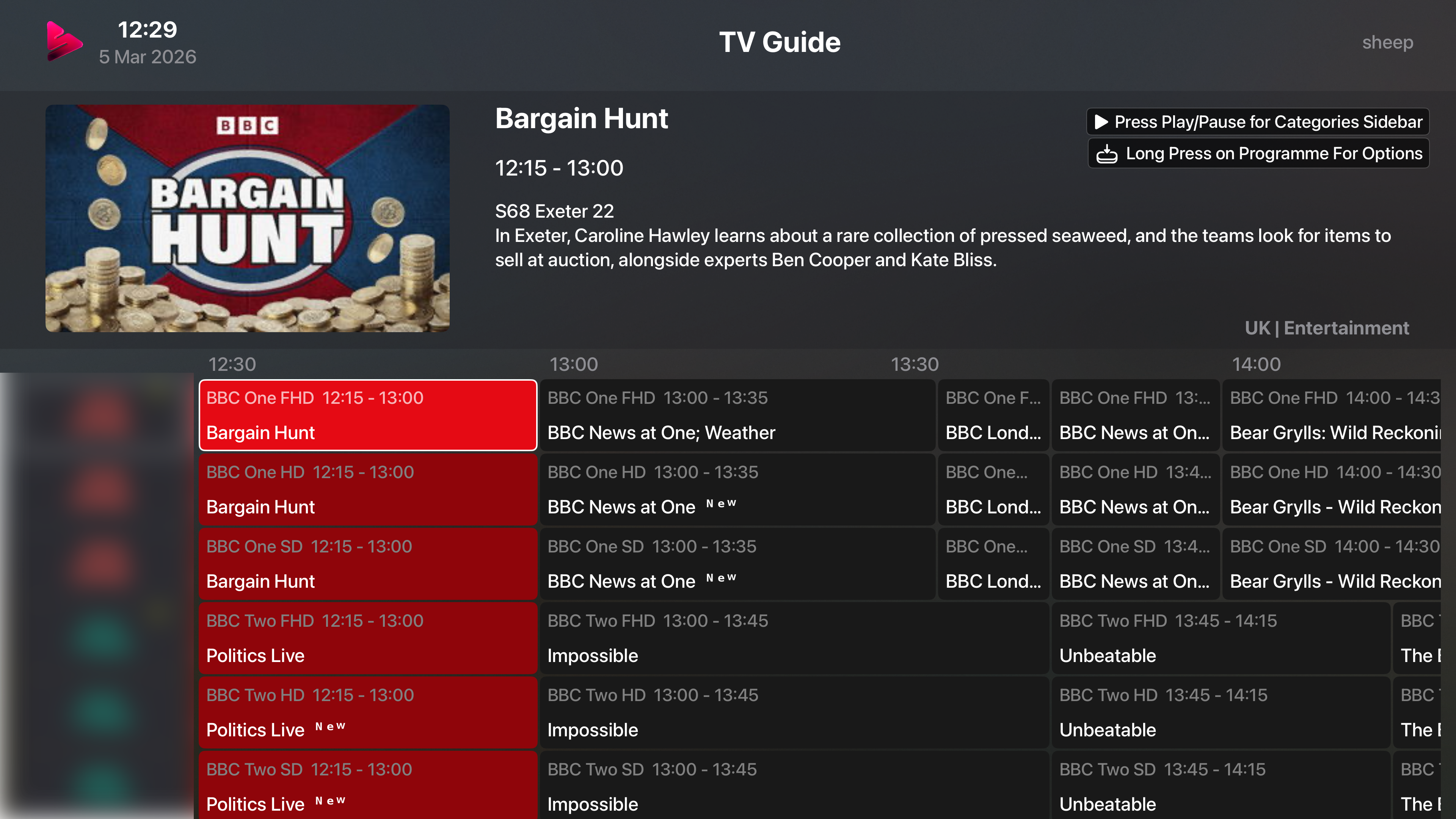
Electronic Program Guide

Built for sports fans

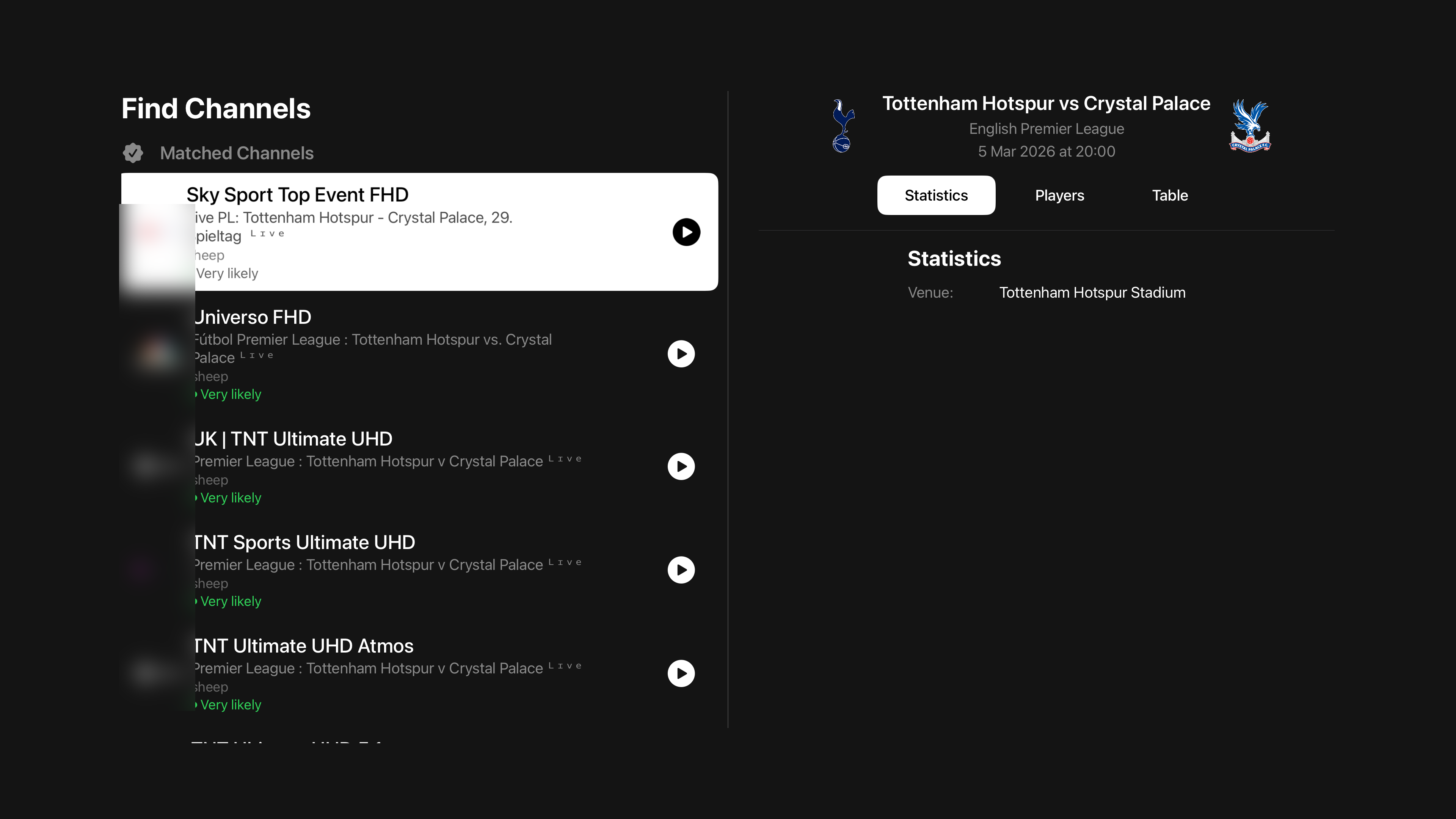
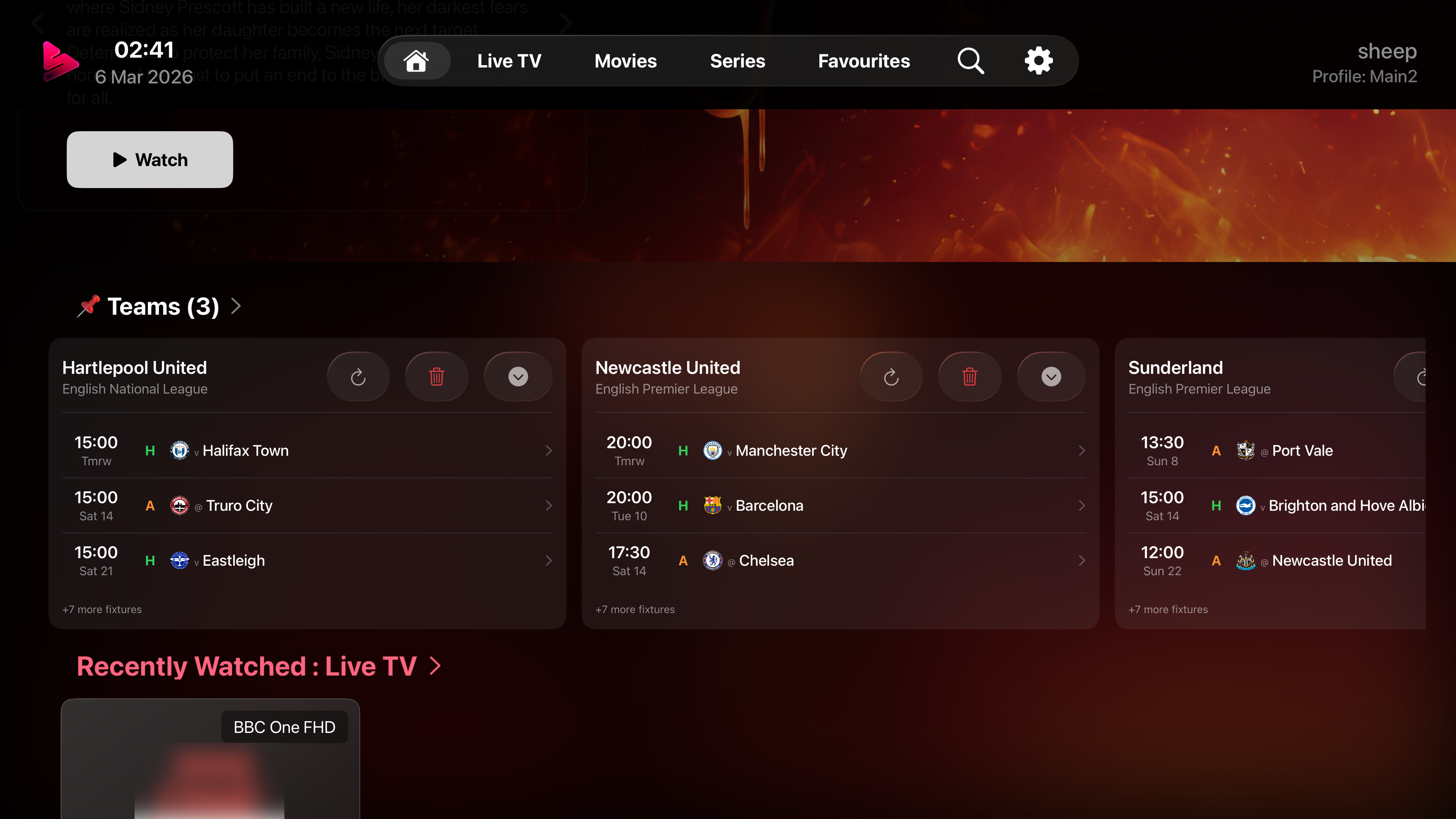
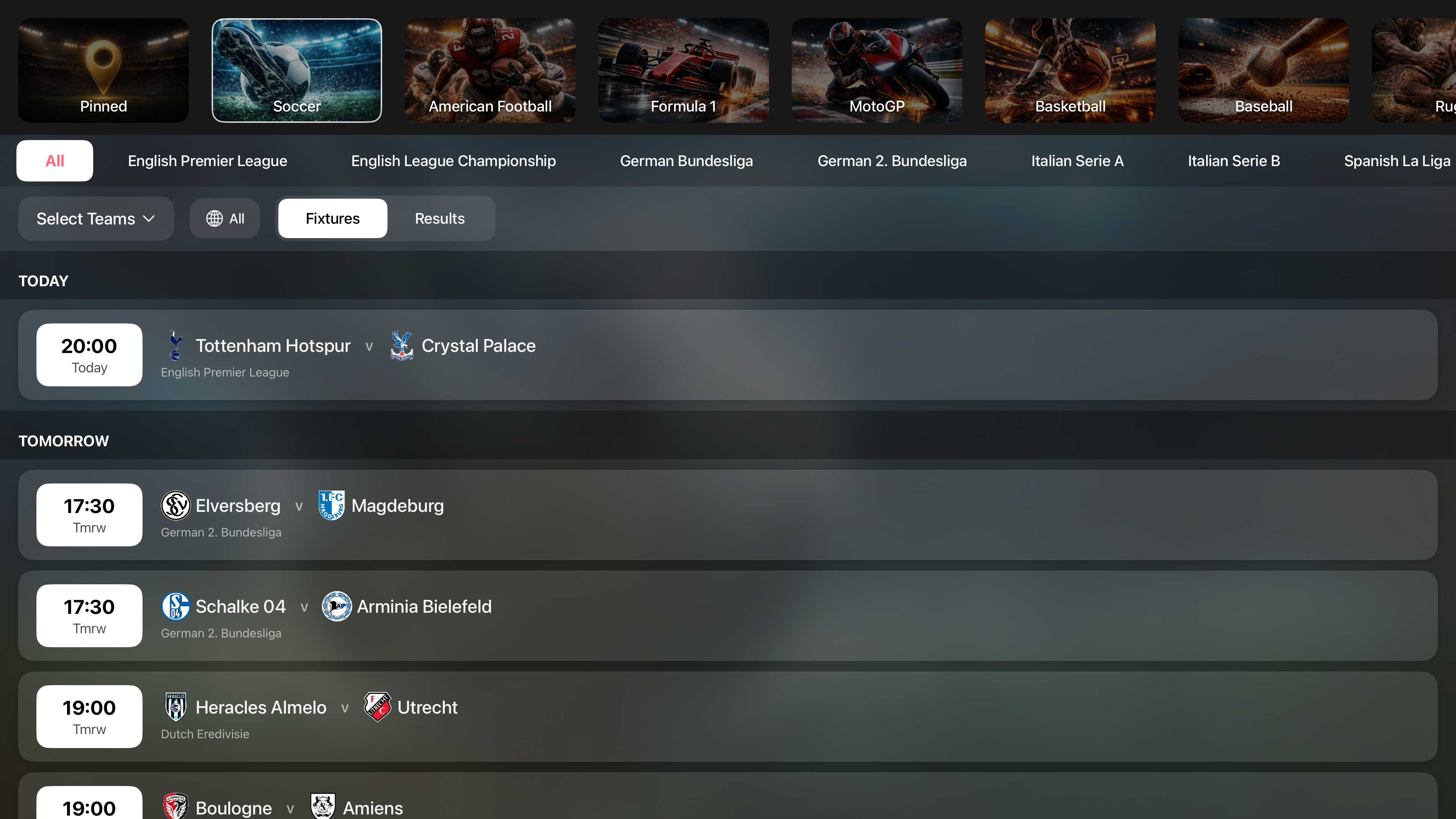
Live fixtures, league tables, and team tracking — all integrated directly into the app. No second screen needed.

🏟️

Live Fixtures & Scores

See today's matches at a glance with real-time fixture data across football, basketball, and more. Know exactly when your team plays and jump straight to the channel — one tap from schedule to stream.

🏆

League Tables

Full standings for the leagues you follow, updated automatically. Track your team's position throughout the season without leaving the app.

📌

Pin Your Teams

Pin your favourite teams to get their fixtures front and centre. Your teams are highlighted across the app so you never miss a match that matters to you.

🖥️

Multi-Screen for Match Day

Watch up to 9 channels simultaneously — perfect for following multiple matches at once. Split-screen your way through a full day of fixtures.

Your content, your way

Powerful tools to manage, merge, and customize your playlists and channels.

📁

Multiple Playlists

Add multiple IPTV providers side by side — supports playlist links and Xtream Codes login. Playlists update automatically in the background.

Super Playlists

Got multiple IPTV providers? Combine them into one view — see all your sports channels, movies, or series from every provider in a single list.

🏷️

Custom Categories

Build your own channel groups with drag-and-drop. Organize content exactly the way you think about it.

Favourites

Unified favourites across live TV, movies, and series — always one tap away from the content you love.

🔧

Content Management

Hide, rename, and filter channels by keyword. Take full control over what appears in your library.

🔍

Search

Global search across all content types — live channels, movies, and series — with instant, filtered results.

Your experience, your rules

Profiles, themes, widgets, privacy, diagnostics, and setup — everything you need to make it work your way.

👤

User Profiles

Create multiple profiles, each with their own settings, favourites, watch progress, and home screen layout. Everyone in the household gets their own personalised experience — no compromises.

🔗

Link Family

Share a profile to another device using a secure pairing code. Perfect for setting up a child's Apple TV or iPad with pre-configured channels, favourites, and parental locks — without giving them access to your profile.

🔒

Parental Controls

PIN-protected access with per-channel and per-category locking. Restrict what each profile can see and keep content safe for the whole family.

🎨

Appearance

Pick your accent color, choose dark or light mode, switch between grid and list layouts, and customize your tab bar.

🏠

Home Screen

Drag to reorder sections, pin your favourite content, and build the perfect landing page for your viewing habits.

🌍

Localization

Available in 11 languages so you can enjoy the full experience in your preferred language.

📱

iOS Widgets

Favourites, recently watched, and continue watching — right on your home screen without opening the app.

📺

tvOS Top Shelf

Your content featured prominently on the Apple TV home screen with rich, immersive artwork.

📡

Network Diagnostics

Built-in tools to test stream connectivity, measure bandwidth, and troubleshoot playback issues.

Easy Setup

Add your IPTV provider in seconds — paste a playlist link or enter your login details. You'll be watching in under a minute.

💾

Backup & Restore

JSON export, CloudKit backup, and web transfer. Your configuration is always portable and recoverable.

🛡️

Privacy

Your data stays yours. No personal data is shared, no tracking, no analytics sold to third parties. Privacy by design.

Integrated with everything

Sync, stream, and control — deep integrations with the services you already use.

☁️

Cloud Sync

Seamless Firebase sync keeps your settings, favourites, and progress in perfect harmony across every device.

📊

Trakt.tv

Bidirectional watch history sync with Trakt. Your viewing habits, tracked and shareable.

🎞️

TMDB Integration

Automatic metadata, trending and popular titles, and smart mismatch detection to keep your library accurate.

Rating Posters (RPDB)

See IMDb and TMDB ratings displayed directly on movie and series artwork — no need to open each title to check scores.

📦

TorBox

Stream or download content from torrent and Usenet sources via the TorBox cloud service — all from within the app.

🔗

AIOStreams

Connect to additional streaming catalogues and addons from the Stremio ecosystem. More content sources, all in one app.

🟠

Plex & Emby

Browse your Plex and Emby libraries natively. All your media, one interface.

Your personal media server

Snappier Server is a free companion app for macOS, Windows, and Linux that unlocks recording, downloads, and web management. Install it alongside Snappier IPTV to turn your setup into a fully managed media centre.

🖥️

Snappier Server

A free companion app for macOS, Windows, and Linux that runs alongside Snappier IPTV. It unlocks PVR recording, downloads, server-side catchup, an EPG editor, and a full web interface — turning any computer into a powerful media centre.

Learn More & Download
🔴

PVR Recording

Schedule and record live TV directly to your device. Set one-off or recurring recordings and never miss your favourite shows.

Server Catchup

Missed something? Snappier Server keeps a rolling buffer so you can rewind and watch programmes you missed — even without provider catchup support.

📥

Downloads

Download movies, episodes, and recordings for offline viewing. Manage your download queue and storage from the app or the web.

📝

EPG Editor

Full editor mode to manage, fix, and customise your EPG data. Remap channels, correct programme info, and fill in gaps manually.

🌐

Web Control

Manage everything from a browser on your local network — playlists, EPG, settings, recordings, and more. No app needed.

📋

Playlist Management

Add, edit, and organise your playlists from the web interface. Bulk operations, drag-and-drop reordering, and instant sync to all devices.

📡

Remote Access

Access your Snappier Server from any device on your local network. Control recordings, manage content, and configure settings without touching the main device.

Got a question? Need help?

Our Discord community is the best place to get support, report bugs, request features, and chat with the developer directly.

💬

Direct Developer Access

Talk to the developer directly in Discord. No ticket queues, no waiting days for email replies — get real answers from the person who builds the app.

👥

Community Help

Join hundreds of Snappier users sharing tips, setups, and solutions. Chances are someone has already solved what you're stuck on.

💡

Shape the Roadmap

Request features, check the public roadmap, and see upcoming changes before they ship. Your feedback directly influences the app.

💬 Join Our Discord Community

Note: Discord performs a VPN & bot detection check when you join. Once in, head to the #welcome channel and click the verify button to gain full access to all channels.