Snappier IPTV
Your Premium IPTV Experience
All features. All devices. One subscription.
Snappier IPTV
All features. All devices. One subscription.
Snappier IPTV is a player app — bring your own IPTV subscription. We do not provide channels or content.
Why Snappier?
Snappier IPTV is built for people who want a fast, polished IPTV player without the clutter. It works with your existing IPTV subscription and gives you a premium viewing experience across all your Apple devices — from iPhone to Apple TV.
Sports
Live fixtures, league tables, and team tracking — all integrated directly into the app. No second screen needed.
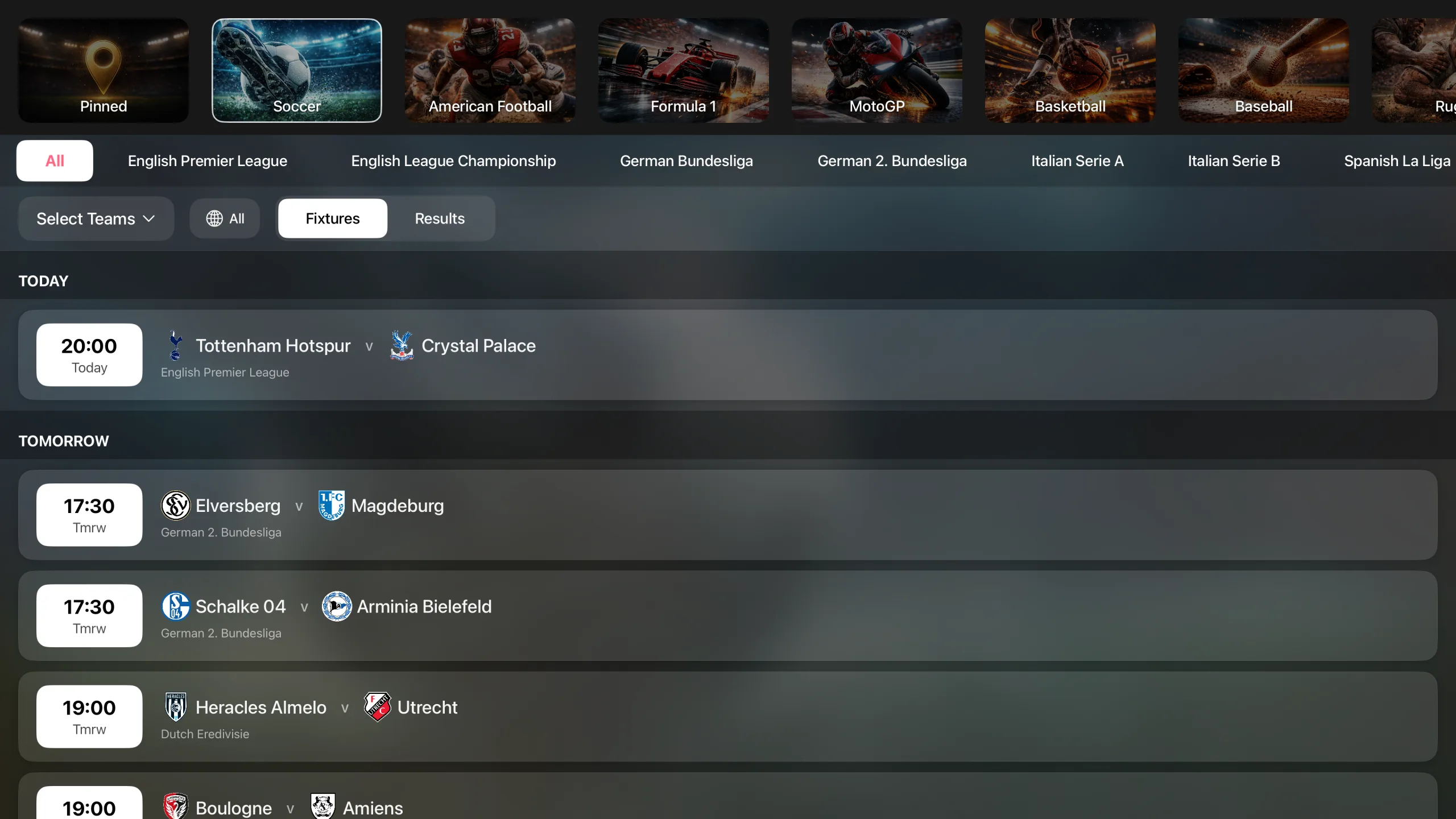
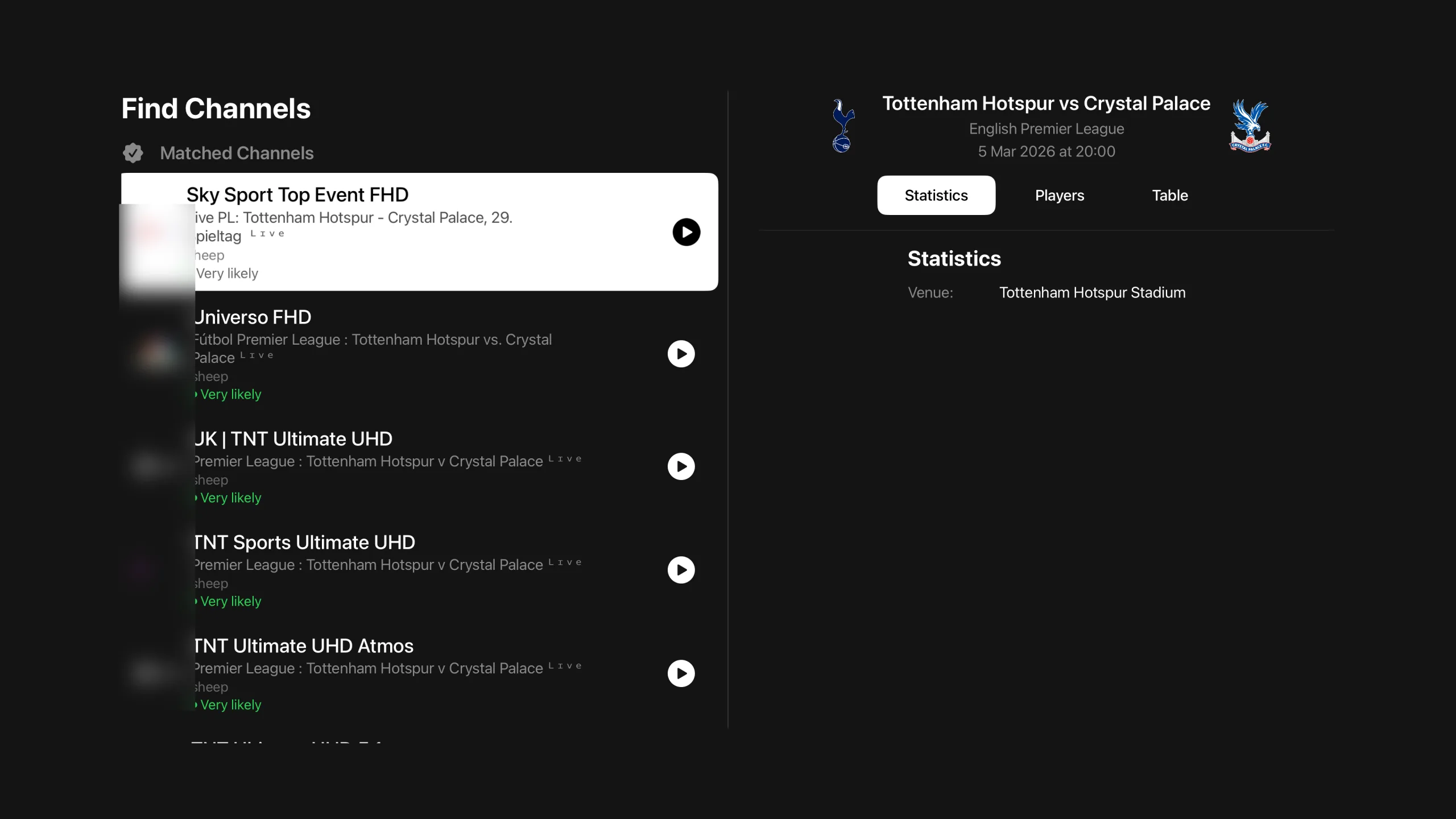
See today's matches at a glance with real-time fixture data across football, basketball, and more. Know exactly when your team plays and jump straight to the channel — one tap from schedule to stream.
Full standings for the leagues you follow, updated automatically. Track your team's position throughout the season without leaving the app.
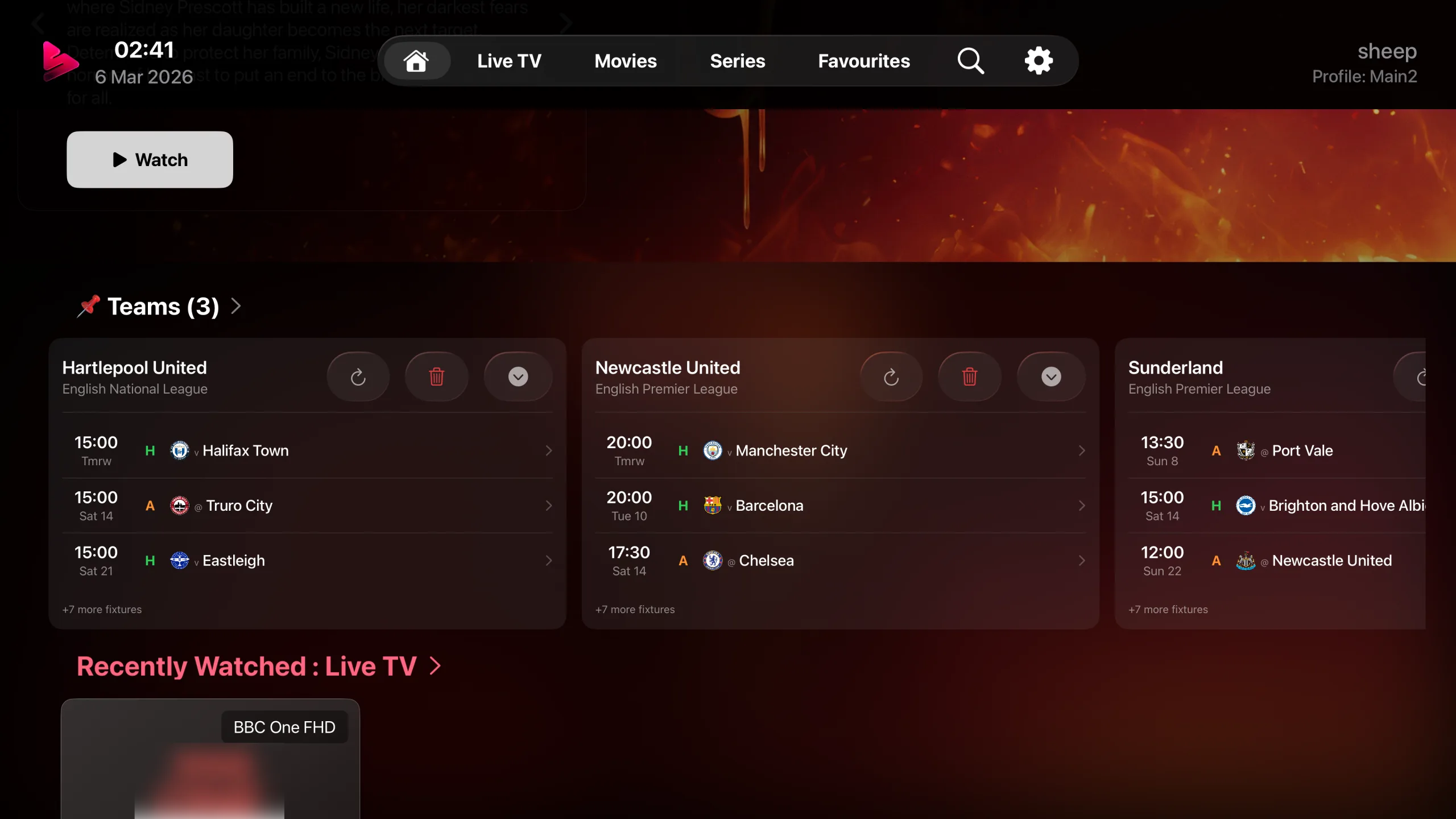
Pin your favourite teams to get their fixtures front and centre. Your teams are highlighted across the app so you never miss a match that matters to you.
Watch up to 9 channels simultaneously — perfect for following multiple matches at once. Split-screen your way through a full day of fixtures.
Watch
From live TV to movies and series — a cinematic viewing experience on every device.
Browse channels in grid, list, hub, or EPG view, organized by category with channel logos, recently watched, and fast playback.
Rich TMDB metadata with posters, ratings, season browsers, and automatic watch progress tracking across devices.
Watch up to 9 channels simultaneously with flexible multi-player layouts. Perfect for sports fans and news junkies.
Choose your preferred player — KSPlayer, AetherEngine, or launch in Infuse or VLC app. Seamless codec support for every stream.
OpenSubtitles.com integration, speech recognition that turns audio into subtitles (iOS/iPadOS/tvOS), and fully customizable subtitle appearance to match your preferences.
Keep watching while you browse. Native PiP support lets you multitask without missing a moment. (iOS/iPadOS, and tvOS with AetherEngine)
Missed a show? Rewind and watch programmes from the past with provider-supported catchup and timeshift.
Paste any URL and play it instantly. Direct support for HLS, MPEG-TS, and other streaming protocols.
Scrub through content with intuitive forward and rewind controls. Jump ahead or back with customisable skip intervals.
Pick up right where you left off. Snappier remembers your position in movies, series, and live streams across sessions.
Watch trailers and bonus content for movies and series powered by TMDB.
Automatic HDR and framerate switching on Apple TV. Your display adapts to match the content for the best picture quality.
Exclusive Feature
Snappier IPTV has its own built-in EPG service. When your provider's programme data is missing or incomplete, Snappier can fill in the listings for supported providers.
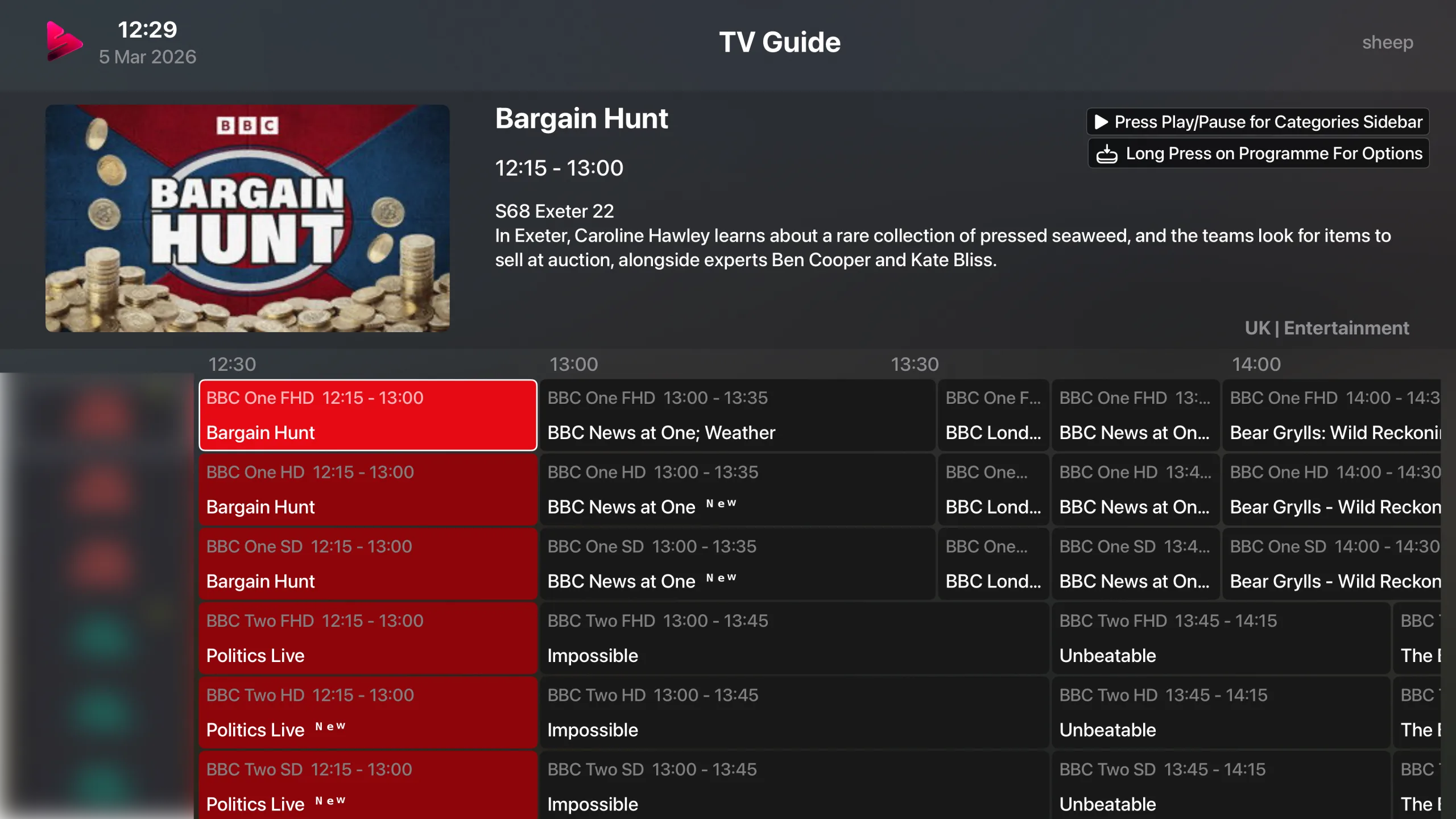
Most IPTV apps rely entirely on your provider's EPG data. Snappier IPTV ships with its own EPG service that automatically matches your channels to programme listings — no configuration needed. If your provider's EPG is missing or incomplete, Snappier can fill the gaps for supported providers.
A real-time, scrollable grid that shows what's on now and next across all your channels. Filter by category, search by programme name, and jump straight to any channel — just like a traditional TV guide, but better.
Even the largest TV guide files load in seconds, not minutes. Multiple processing engines work in parallel so your programme listings are ready almost instantly.
Use your provider's EPG or our built-in service. If your provider's EPG is missing countries or doesn't offer one at all, Snappier's guide can fill the gap for supported providers.
Organize
Powerful tools to manage, merge, and customize your playlists and channels.
Add multiple IPTV providers side by side — supports playlist links and Xtream Codes login. Playlists update automatically in the background.
Got multiple IPTV providers? Combine them into one view — see all your sports channels, movies, or series from every provider in a single list.
Requires Snappier Console access, which is enabled within the app.
Build your own channel groups with drag-and-drop. Organize content exactly the way you think about it.
Unified favourites across live TV, movies, and series — always one tap away from the content you love.
Hide, rename, and filter channels by keyword. Take full control over what appears in your library.
Global search across all content types — live channels, movies, and series — with instant, filtered results.
Customize & More
Profiles, themes, widgets, privacy, diagnostics, and setup — everything you need to make it work your way.
Create multiple profiles, each with their own settings, favourites, watch progress, and home screen layout. Everyone in the household gets their own personalised experience — no compromises.
Share a profile to another device using a secure pairing code. Perfect for setting up a child's Apple TV or iPad with pre-configured channels, favourites, and parental locks — without giving them access to your profile.
PIN-protected access with per-channel and per-category locking. Restrict what each profile can see and keep content safe for the whole family.
Pick your accent color, switch between grid and list layouts, and customize your tab bar.
Drag to reorder sections, pin your favourite content, and build the perfect landing page for your viewing habits.
Available in 11 languages so you can enjoy the full experience in your preferred language.
Favourites, recently watched, and continue watching — right on your home screen without opening the app.
Your content featured prominently on the Apple TV home screen with rich, immersive artwork.
Built-in tools to test stream connectivity, measure bandwidth, and troubleshoot playback issues.
Add your IPTV provider in seconds — paste a playlist link or enter your login details. You'll be watching in under a minute.
JSON export, CloudKit backup, and web transfer. Your configuration is always portable and recoverable.
Your data stays yours. No personal data is shared, no tracking, no analytics sold to third parties. Privacy by design.
Connect
Sync, stream, and control — deep integrations with the services you already use.
Seamless Firebase sync keeps your settings, favourites, and progress in perfect harmony across every device.
Bidirectional watch history sync with Trakt and Simkl. Your viewing habits, tracked and shareable.
Automatic metadata, trending and popular titles, and smart mismatch detection to keep your library accurate.
See IMDb and TMDB ratings displayed directly on movie and series artwork — no need to open each title to check scores.
Browse your Plex, Emby and Jellyfin libraries and WebDAV shares natively. All your media, one interface.
Server & Web Control
Snappier Server is a free companion app for macOS, Windows, and Linux that unlocks recording, downloads, and web management. Install it alongside Snappier IPTV to turn your setup into a fully managed media centre.
Schedule and record live TV directly to your device. Set one-off or recurring recordings and never miss your favourite shows.
Missed something? Snappier Server keeps a rolling buffer so you can rewind and watch programmes you missed — even without provider catchup support.
Download movies, episodes, and recordings for offline viewing. Manage your download queue and storage from the app or the web.
Full editor mode to manage, fix, and customise your EPG data. Remap channels, correct programme info, and fill in gaps manually.
Manage everything from a browser on your local network — playlists, EPG, settings, recordings, and more. No app needed.
Add, edit, and organise your playlists from the web interface. Bulk operations, drag-and-drop reordering, and instant sync to all devices.
Access your Snappier Server from any device on your local network. Control recordings, manage content, and configure settings without touching the main device.
Snappier Server keeps your programme guide updated in real time.
Connect your Plex, Emby and Jellyfin servers to Snappier Server and browse all your libraries in one place.
Guides
Step-by-step guides with screenshots for every device, covering live TV, the TV guide, movies, series, playback and settings.
Support
Our Discord community is the best place to get support, report bugs, request features, and chat with the developer directly.
Talk to the developer directly in Discord. No ticket queues, no waiting days for email replies — get real answers from the person who builds the app.
Join hundreds of Snappier users sharing tips, setups, and solutions. Chances are someone has already solved what you're stuck on.
Request features, check the public roadmap, and see upcoming changes before they ship. Your feedback directly influences the app.
Note: Discord performs a VPN & bot detection check when you join. Once in, head to the #welcome channel and click the verify button to gain full access to all channels.